> For the complete documentation index, see [llms.txt](https://documentation.hyprmx.com/llms.txt). Markdown versions of documentation pages are available by appending `.md` to page URLs; this page is available as [Markdown](https://documentation.hyprmx.com/sdk-integration-guides/ios/3rd-party-mediation/admob-mediation.md).
# AdMob Mediation
## Introduction
HyprMX iOS AdMob Adapter allows you to integrate HyprMX in your AdMob rewarded, interstitial, and banner/MREC waterfalls. The adapter can be set up with CocoaPods or by Manual Installation. See below for instructions on how to set up a new adapter or upgrade to newer versions.
{% hint style="info" %}
[Apple Privacy Manifest](https://developer.apple.com/documentation/bundleresources/privacy_manifest_files) is included in iOS SDK 6.3.0.1+
{% endhint %}
## Compatibility
The HyprMX-AdMob adapter version 6.4.7.0 is compatible with AdMob 11.0+. If you need support for an older version of AdMob, please reach out to your HyprMX account manager.
## Setup Instructions
This guide assumes you already have the AdMob iOS SDK integrated into your Xcode project. You can either set up the adapter by using Swift Package Manager, [CocoaPods](#cocoapods-integration), or through [manual integration](#manual-installation).
### Swift Package Manager Integration
{% stepper %}
{% step %}
From XCode's menu bar, navigate to File / Add Package Dependencies...
{% endstep %}
{% step %}
Place the following text into the search bar located in the upper right of the dialog.
```
https://github.com/JunGroupProductions/HyprMX-AdMob-SPM.git
```
{% endstep %}
{% step %}
Select the "Exact Version" option for the Dependency Rule and use the following version:
```
6.4.70
```
{% endstep %}
{% step %}
Click the "Add Package" button.
{% endstep %}
{% endstepper %}
### CocoaPods Integration
{% stepper %}
{% step %}
Install or update [CocoaPods](https://cocoapods.org/) to version 1.10.2 or newer.
{% endstep %}
{% step %}
Add the following to your Podfile:
```
pod 'HyprMX-AdMob', '6.4.7.0'
```
The HyprMX-AdMob Pod requires `pod 'Google-Mobile-Ads-SDK'` with version`'11.0.0'` or greater.
{% endstep %}
{% endstepper %}
### Manual Installation
To manually update the adapter, follow the steps below.
{% hint style="info" %}
If you have set up the adapter before and are upgrading, perform steps 1 and 2. If not, skip to step 3.
{% endhint %}
{% stepper %}
{% step %}
Remove HyprMX.framework and all HyprMX adapter files from your project.
{% endstep %}
{% step %}
Find your target's Build Phases tab and open Link Binary with Libraries. If it exists, remove HyprMX.framework from this list.
{% endstep %}
{% step %}
Download the adapter file [here](/sdk-integration-guides/ios/downloads.md) and unzip the file.
{% endstep %}
{% step %}
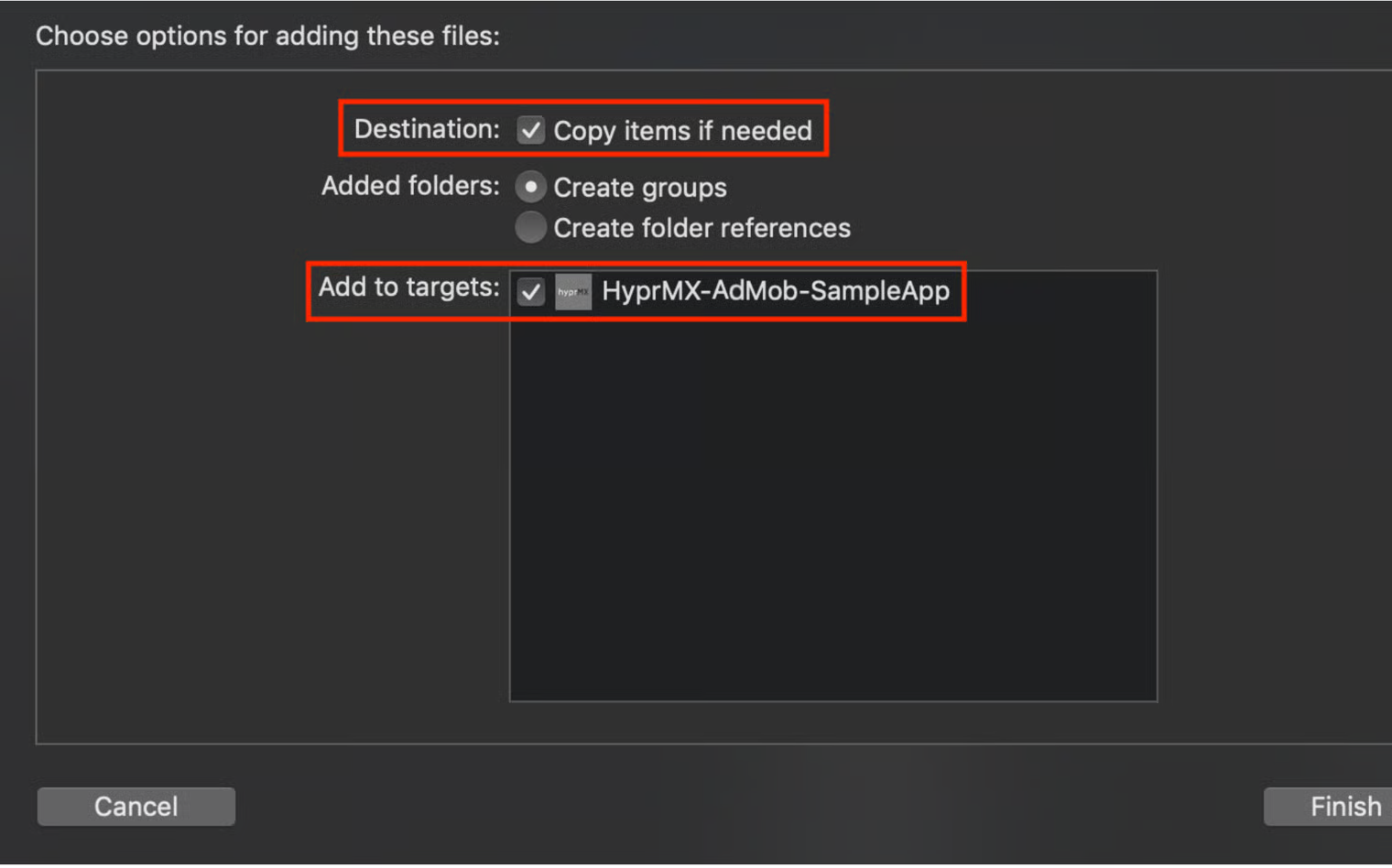
Add the HyprMX.xcframework to the project.
Make sure to copy and verify the target membership.
{% endstep %}
{% step %}
Find your target's General tab, open Frameworks, Libraries, and Embedded Content and set the HyprMX.xcframework to Embed & Sign.
{% endstep %}
{% step %}
Add the AdMob-Adapter folder to the project. Make sure to copy and verify the target membership.
{% endstep %}
{% step %}
Ensure that your ATS (App Transport Security) settings are as described by [AdMob](https://developers.google.com/admob/ios/app-transport-security).
{% endstep %}
{% step %}
Add or confirm that info.plist contains the required Privacy Keys. For more information, see the [Configuring Privacy Controls](#hyprmxmobilesdkadmobadapteroverview-configuringprivacycontrols) section below.
{% endstep %}
{% step %}
Optional: Set user consent, as shown [below](#hyprmxmobilesdkadmobadapteroverview-optional-userid-and-userconsent-1).
{% endstep %}
{% endstepper %}
{% hint style="warning" %}
Please note that the user ID has been removed in version 6.4.2.0 and can be safely removed from the integration.
{% endhint %}
That's it! You're up and running with the latest version of the HyprMX SDK.
## Configuring Privacy Controls
iOS 14 introduced the [AppTrackingTransparency](https://developer.apple.com/documentation/apptrackingtransparency) framework to allow users control over the use of their Advertising Identifier.
The HyprMX 6.0.0+ SDK requires the \`NSUserTrackingUsageDescription Plist Key to determine the authorization state.
iOS requires that the use of a user's camera, calendar, photo library, IDFA, etc. be declared by advertisers in the plist. Add all of the following entries to your app's plist.
```
NSCameraUsageDescription${PRODUCT_NAME} requests write access to the CameraNSPhotoLibraryAddUsageDescription${PRODUCT_NAME} requests write access to the Photo LibraryNSUserTrackingUsageDescription${PRODUCT_NAME} would like to show you personalized ads
```
## SKAdNetwork Identifier
The HyprMX 6.0.0+ SDK supports Apple's new SKAdNetwork for Attribution. To add the HyprMX SKAdNetwork ID to your info.plist:
```
SKAdNetworkItemsSKAdNetworkIdentifiernu4557a4je.skadnetwork
...
```
Note: SKAdNetwork IDs are case sensitive. For more information about SKAdNetwork please refer to Apple's [documentation](https://developer.apple.com/documentation/storekit/skadnetwork).
## Integrating HyprMX On The AdMob Dashboard Using Custom Events
{% stepper %}
{% step %}
Create your Mediation Group on the AdMob dashboard. If you are integrating Interstitial and Rewarded Video, follow these steps for both.
{% endstep %}
{% step %}
In the Ad Sources section, select `Add Custom Event`.
{% endstep %}
{% step %}
In the popup, enter a unique label such as `HyprMX Placement1` in the label field and set the default eCPM (e.g. $15.00).
{% endstep %}
{% step %}
Click 'Continue'.
{% endstep %}
{% step %}
Set the adapter Class Name:
{% endstep %}
{% step %}
In the parameter field, enter the distributor ID and placement name assigned to you by your HyprMX account manager.
Please reach out to your account manager with what placements you'd like to use in your app and whether they will be rewarded or interstitial. The example below will assume that your account manager has created a "HyprMX Placement 1" placement.
```
{ "distributorID": "YOUR_DISTRIBUTOR_ID", "placementName": "HyprMX Placement1" }
```
{% endstep %}
{% step %}
Click 'Done' and then 'Save'.
{% endstep %}
{% endstepper %}
## Optional: Tag for Child Directed Treatment
Regional laws and regulations such as COPPA, GDPR, and [Apple's Privacy Policy](https://www.apple.com/privacy/) require child-directed treatment of applicable users. It is the responsibility of the app developer to ensure compliance with applicable laws and regulations.
For instructions on how to tag the ad request as child-directed, please follow [AdMob's child-directed setting documentation](https://developers.google.com/admob/ios/targeting#child-directed_setting).
## Optional: User Consent
#### Importing HyprMXAdapterConfiguration
To provide Consent Status to HyprMX, you will need to import the `HyprMXAdapterConfiguration` header into your project.
{% tabs %}
{% tab title="Swift" %}
```objectivec
// Add the following to your project's Bridging-Header.h
#import "HyprMXAdapterConfiguration.h"
```
{% endtab %}
{% tab title="ObjectiveC" %}
```objectivec
#import "HyprMXAdapterConfiguration.h"
```
{% endtab %}
{% endtabs %}
#### Adding User Consent Status
HyprMX provides an API to indicate a user’s consent status. This API will be used to indicate a user’s opt-in or opt-out consent for the collection and use of personal data under applicable laws and jurisdictions (GDPR, CPRA, etc.). On App launch, the Consent value will be `CONSENT_STATUS_UNKNOWN`. You can set `CONSENT_DECLINED` by calling setHasUserConsent(false), or `CONSENT_GIVEN` with setHasUserConsent(true) depending on the user's consent collected by your application.
It is recommended to set the consent status once on App Launch and whenever your user changes their consent status.
{% tabs %}
{% tab title="Swift" %}
```swift
HyprMXAdapterConfiguration.setHasUserConsent(false) // Consent is declined
HyprMXAdapterConfiguration.setHasUserConsent(true) // Consent has been granted
```
{% endtab %}
{% tab title="Objective-C" %}
```
[HyprMXAdapterConfiguration setHasUserConsent:NO]; // Consent is declined
[HyprMXAdapterConfiguration setHasUserConsent:YES]; // Consent has been granted
```
{% endtab %}
{% endtabs %}
## License
By integrating the HyprMX SDK, you are agreeing to the [End User License Agreement](https://hyprmx.com/eula.html).
---
# Agent Instructions
This documentation is published with GitBook. GitBook is the documentation platform designed so that both humans and AI agents can read, navigate, and reason over technical content effectively. Learn more at gitbook.com.
## Querying This Documentation
If you need additional information that is not directly available in this page, you can query the documentation by asking a question.
Perform an HTTP GET request on the following URL with the `ask` and `goal` query parameters:
```
GET https://documentation.hyprmx.com/sdk-integration-guides/ios/3rd-party-mediation/admob-mediation.md?ask=&goal=
```
`ask` is the immediate question: it should be specific, self-contained, and written in natural language.
`goal` is what the user is ultimately trying to achieve, the reason they need the answer. Sharing it helps GitBook give you a better, more relevant answer. A goal is most helpful when it describes the outcome the user wants rather than restating the question. For example, with `ask=how do I create an API token`, a goal like `automate deployments from our CI pipeline` lets GitBook tailor the answer to that use case.
The response will contain a direct answer to the question and relevant excerpts and sources from the documentation.
Use this mechanism when the answer is not explicitly present in the current page, you need clarification or additional context, or you want to retrieve related documentation sections.